The treasurer's page: owed, collected, chasing, waivers and the export
One page for what the club is owed and has collected. Only people who hold the treasurer or admin role for the club can open it: in the menu, choose Treasurer.
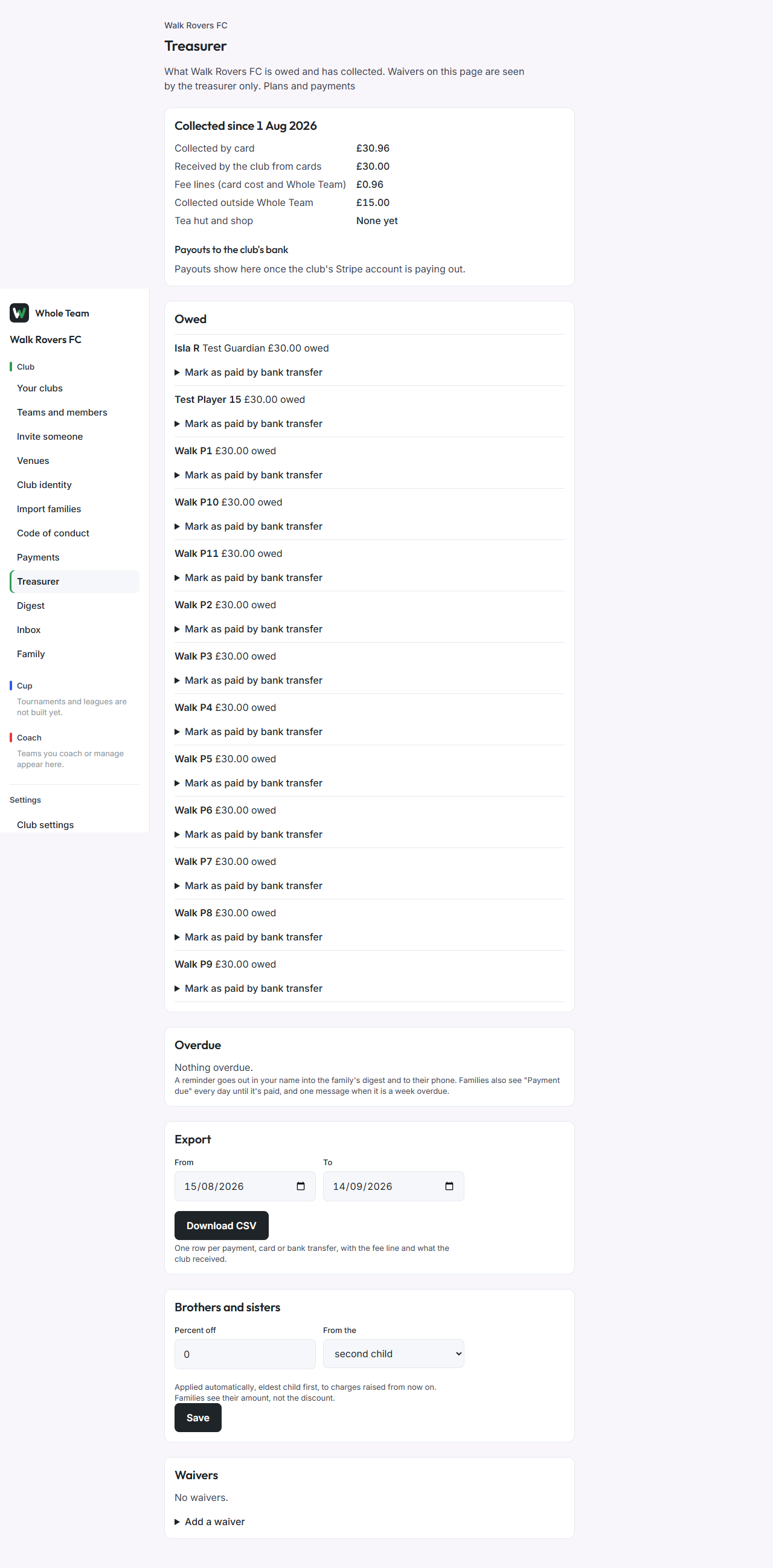
Collected since the season started
The first panel shows, since the club's season start date:
- Collected by card: what families paid by card, fee lines included.
- Received by the club from cards: the same payments less their fee lines.
- Fee lines: Stripe's card cost and Whole Team's charge together.
- Collected outside Whole Team: payments you marked as paid by bank transfer.
- Payouts to the club's bank: Stripe's payouts and the date each arrives, once the club's account is paying out.
Tea hut and shop totals appear here once those are in use.
Owed, and marking a bank transfer
Owed lists each child (and each adult player) with what they owe now, and any session fees not billed yet.
- Choose Mark as paid by bank transfer under the child.
- Add a note if you want one, for example the date it reached the bank.
- Choose Mark paid. Everything owed for that child is settled, with no fee line, and recorded with your name.
Marking a bank transfer is free and has no limit.
Chasing
Overdue lists families with something unpaid past its due date: who, for which child, how much and for how many days, and when they were last reminded.
- Choose Send a reminder.
- It goes out in your name: into the family's digest, to every guardian of the child, and to their phones.
You can send one reminder a family a day. The app also chases for you: families see "Payment due" in their digest every day until it's paid, and get one message on their phone when it's a week overdue. Nothing more is sent.
Brothers and sisters
- Under Brothers and sisters, enter the Percent off and choose which child it starts from.
- Choose Save.
The discount is applied automatically, eldest child first, to charges raised from then on. Families see the amount they owe, never the discount.
Waivers
A waiver helps a family who can't pay in full. Only the treasurer sees it; the family sees only their amount.
- Choose Add a waiver.
- Choose the Family.
- Choose the kind:
- Nothing to pay: their charges are raised already waived.
- Part off each charge: enter how much comes off each one.
- Pay later: their charges wait, unbilled and not chased, until you end the waiver.
- Give a Reason. It is for your records only and never appears in the export or to the family.
- Choose Save waiver.
A waiver applies to charges raised after you save it. End waiver stops it; ending a pay-later waiver makes the waiting charges payable.
The export
- Under Export, choose From and To dates.
- Choose Download CSV.
One row per payment, card or bank transfer, with these columns in this order: date, time, type, club, team, person, child, description, amount_charged, fee_line, amount_to_club, currency, method, stripe_charge_id, stripe_payout_id, payout_date, entered_by, status, note. A bank transfer row has your name under entered_by and no Stripe id.
Good to know
- The screenshots were taken on a test club with simulated card payments.
- Payout ids and dates per payment are blank in the export for now.