Photo consent for your child
Your child appears in their team's photos only if you say yes. You're asked once, when you add or confirm your child, and there's no answer chosen for you. You can change your mind at any time, and turning it off blurs your child in every photo, old ones included, within a minute.
Answering
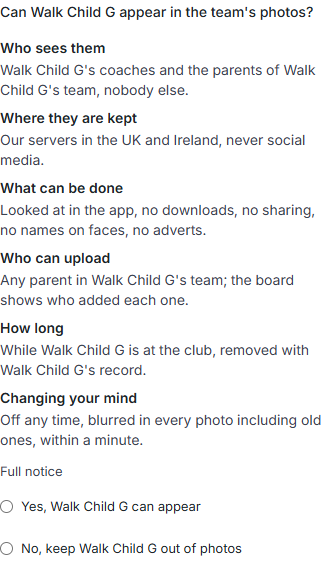
- When you add a child, or confirm one your club invited, you see Can your child appear in the team's photos?
- Read the six points:
- who sees the photos;
- where they're kept;
- what can be done with them;
- who can upload;
- how long they're kept;
- how to change your mind.
- Choose Yes or No. You can't carry on without an answer.
If a child was added before this question existed, their card on Family asks it once under their photos.
Seeing and changing your answer
- Open Family. Each child's card has a photos section.
- It shows Photo consent for your child as On or Off, when you set it, and how many photos are on their team's board.
- Choose Turn off for or Turn on for your child.
- If you and another guardian disagree, off wins: any guardian can keep a child out of photos.
- Parents uploading to the board are told how many players can't be shown, never who.
What turning it off does
- Within a minute: every face that was shown on your child's team boards, this season and past seasons, is blurred again.
- Until then: the board holds those photos back, so nobody sees them while they're being redone.
- Other children: faces aren't recognised, so every shown face in those photos is blurred, not only your child's. A coach can't un-blur them.
- Turning it back on lets your child appear in new photos. Photos that were blurred stay blurred.