


Safeguarding checks: who is checked, and when
The club's record of each coach's and manager's safeguarding checks (PVG, DBS or AccessNI) and the qualifications the club asks for. It holds a check type, the membership or certificate number, dates and who verified it. It never holds what a disclosure says, and there's nowhere to upload a certificate. The safeguarding officer and club admins keep it; each coach sees their own entry.
Open the register
- Safeguarding officer or club admin: choose Coach in the rail on the left, then Coach register.
- Coach: open Coach, choose Sessions (or any coaching page), then Your checks and qualifications.
Record a check
- Under Record a check, choose Who and the Check: PVG, DBS or AccessNI.
- Enter the Membership or certificate number only: digits, with spaces, slashes or hyphens, after a short prefix such as PVG if the number has one. Anything else is refused, so a sentence can't be saved here.
- Enter Issued and the Governing body re-check date if there is one, then choose Record check.
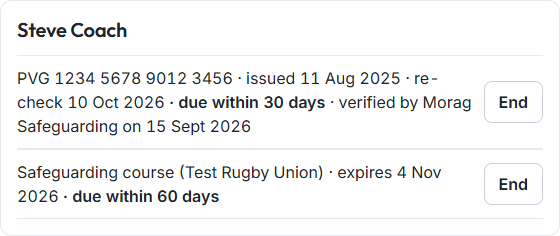
- The entry says who verified it and when.
Qualifications
- Under Qualifications the club asks for, choose Use these for your governing body's starter list, or add each one once: its Name, the Governing body and Renew every (months), then choose Add requirement.
- To record a coach's qualification, choose Who and the Qualification, enter Awarded and Expires, then choose Record qualification.
Expiry
- Entries show due within 60 days, due within 30 days or expired.
- The safeguarding officer's and admins' digest names each check or qualification once at 60 days and again at 30.
- End takes an entry off the register when a check is replaced or a coach leaves. It's kept, not deleted.
Good to know
- Whole Team has a starter list of qualifications for each governing body. See Setting up the register's requirements.
- Parents and other members can't see the register at all.